
AJAX Security System
Wireless security with visual alarm verification, Photo on Demand, and an easy-to-use mobile app for construction projects, businesses, and homes.
Why I chose Ajax

Why I Recommend Ajax
After nearly 30 years in the security industry, I've worked with countless alarm systems. While every system has its strengths, I wanted to offer my customers a platform that combined professional-grade protection with simple everyday operation. Ajax delivers exactly that.
Visual Alarm Verification for greater confidence
I believe seeing what caused an alarm is just as important as knowing an alarm occurred. Features like Visual Alarm Verification and Photo on Demand help reduce uncertainty, allowing you to quickly understand what's happening at your property and make informed decisions.
Support That Doesn't End After Installation
Just as importantly, Ajax fits the way I do business. My goal isn't to install a system and disappear—it's to build long-term relationships by recommending the right solution, providing remote guidance, and being here whenever you need support.
Why Visual Verification Matters
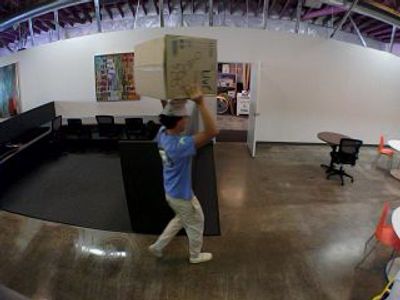
Automatic Alarm Photos
When a compatible MotionCam detects an alarm, it automatically captures a series of images and sends them to authorized users and, when professional monitoring is enabled, to the monitoring center. Instead of guessing what triggered an alarm, you can quickly see what's happening.
Faster, More Confident Decisions
Visual Alarm Verification helps you determine whether an alarm is caused by an intruder, an employee arriving early, wildlife, or another non-emergency event. Having context allows you to respond appropriately without unnecessary uncertainty.
Better Information for Monitoring
When professional monitoring is enabled, alarm photos help operators better understand the situation before contacting you or dispatching emergency services. This additional context helps operators make more informed response decisions while reducing unnecessary dispatches when an alarm isn't a true emergency.
Photo On Demand
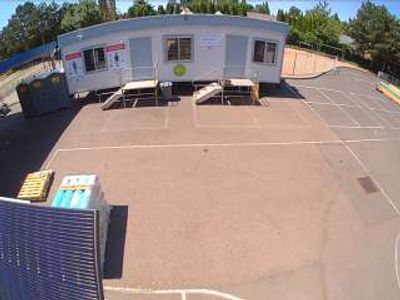
Request Photos Anytime
Compatible Ajax MotionCam devices allow authorized users to request a photo at any time—without triggering an alarm. Whether you're checking on a construction site after hours, confirming a business is secure, or making sure everything looks normal at home, Photo on Demand provides an extra level of confidence right from the Ajax app.
Permission-Based Access
Only users you authorize can request photos. Administrators control who has access, helping protect privacy while ensuring trusted users have the information they need.
See What's Happening Without a Dispatch
Instead of driving to the property or asking someone to check on it, you can quickly verify conditions from your phone. It's a simple way to verify conditions, save time, and make informed decisions before taking further action.
💡 Did You Know?
MotionCam isn't a security camera. It only captures images during an alarm event—or when using Photo on Demand with compatible models—helping protect privacy while still providing visual verification.
See It In Action
Photo on Demand — Day
Photo on Demand — Night
Photo on Demand — Night

Requested by an authorized user during normal daytime conditions.
Photo on Demand — Night
Photo on Demand — Night
Photo on Demand — Night
Requested by an authorized user after dark without triggering an alarm.